前回の続きです。まずサブスクライバーですが、基本的にはメッセージをブローカーからとってきて、それをDB(今回はmongodbを使用)に格納するだけのことしかしません。できるだけサーバリソースを節約したかったのでrustで実装しました。ソースは以下の通りです。環境変数のMONGODB_URLにmongodbのurl、MQTT_BROKERにブローカーのホストを指定するしてビルド、実行するとブローカーからメッセージを取得してDBに格納してくれます。
 use tokio_stream::StreamExt;
 use paho_mqtt as mqtt;
 use std::{env, process, time::Duration};
 use mongodb::{bson::doc, options::ClientOptions, Client};

 use bson::Document;
 use serde_json::{Map, Value};

// The topics to which we subscribe.
const TOPICS: &[&str] = &["sensor"];
const QOS: &[i32] = &[1];

 /////////////////////////////////////////////////////////////////////////////

 async fn get_db_client(url: &str) -> mongodb::error::Result<Client> {
    // Parse your connection string into an options struct
    let mut client_options =
        ClientOptions::parse(url)
            .await?;

    // Manually set an option
    client_options.app_name = Some("Subscriber".to_string());

    // Get a handle to the cluster
    let client = Client::with_options(client_options)?;


    Ok(client)
}

fn main() {
     // Initialize the logger from the environment
     env_logger::init();

     let mongdb_url =  env::var("MONGODB_URL").unwrap();
     let host = env::var("MQTT_BROKER").unwrap();

     // We use the trust store from the Paho C tls-testing/keys directory,
     // but we assume there's a copy in the current directory.
     const TRUST_STORE: &str = "ca.crt";

     // We assume that we are in a valid directory.
     let mut trust_store = env::current_dir().unwrap();
     trust_store.push(TRUST_STORE);

     if !trust_store.exists() {
         println!("The trust store file does not exist: {:?}", trust_store);
         process::exit(1);
     }

     println!("Connecting to host: '{}'", host);

    // Create a client & define connect options
    let mut cli = mqtt::CreateOptionsBuilder::new()
        .server_uri(&host)
        .client_id("mqtt-subscriber")
        .max_buffered_messages(100)
        .persistence(mqtt::PersistenceType::None)
        .create_client().unwrap_or_else(|e| {
            println!("Error creating the client: {:?}", e);
            process::exit(1);
        });

     // Run the client in an async block
     let rt = tokio::runtime::Runtime::new().unwrap();
     if let Err(err) = rt.block_on(async {
        // Get DB Client
        let dbc = get_db_client(&mongdb_url).await.unwrap();
        let collection = dbc.database("mydb").collection("air_condition");

        // Get message stream before connecting.
        let mut strm = cli.get_stream(25);

         let ssl_opts = mqtt::SslOptionsBuilder::new()
             .trust_store(trust_store)?
             .finalize();

        // define the set of options for the connection
        let lwt = mqtt::Message::new("test", "Async subscriber lost connection", mqtt::QOS_1);
         let conn_opts = mqtt::ConnectOptionsBuilder::new()
            .keep_alive_interval(Duration::from_secs(30))
            .mqtt_version(mqtt::MQTT_VERSION_3_1_1)
            .clean_session(false)
            .will_message(lwt)
            .ssl_options(ssl_opts)
            .user_name("user")
            .password("1234")
            .finalize();

        println!("Connection to the MQTT server...");
         cli.connect(conn_opts).await?;

         println!("Subscribing to topics: {:?}", TOPICS);
         cli.subscribe_many(TOPICS, QOS).await?;


        println!("Waiting for messages...");

        while let Some(msg_opt) = strm.next().await {
            if let Some(msg) = msg_opt {
                println!("{}", msg);
                let mut smap: Map<String, Value> = serde_json::from_str(&msg.payload_str()).unwrap();
                let calc_at_val = smap.get("calc_at").unwrap();
                if let Value::String(calc_at_str) = calc_at_val {
                    let calc_at_dt: bson::DateTime = chrono::DateTime::parse_from_rfc3339(calc_at_str).unwrap().into();
                    smap.remove("calc_at");
                    let mut document = Document::try_from(smap).unwrap();
                    document.insert("calc_at",calc_at_dt);

                    let _res = collection.insert_one(document, None).await;
                }
            }
            else {
                println!("Lost connection. reconnecting..");
                while let Err(err) = cli.reconnect().await {
                    println!("Error reconnection: {}", err);
                    tokio::time::sleep(tokio::time::Duration::from_millis(500)).await;
                }
            }
        }

         Ok::<(), mqtt::Error>(())
     }) {
         eprintln!("{}", err);
     }
}今回使用したmongodbですが、MongoDB Atlasというサービスを使用しました。このサービスは無料枠もあり、またDBに格納したデータをグラフとして見える化してくれるChartsというサービスもありますので手っ取り早く見える化するためにこちらを使用しました。実際に今回測定した値をこの機能でグラフにしてみた結果が以下です。
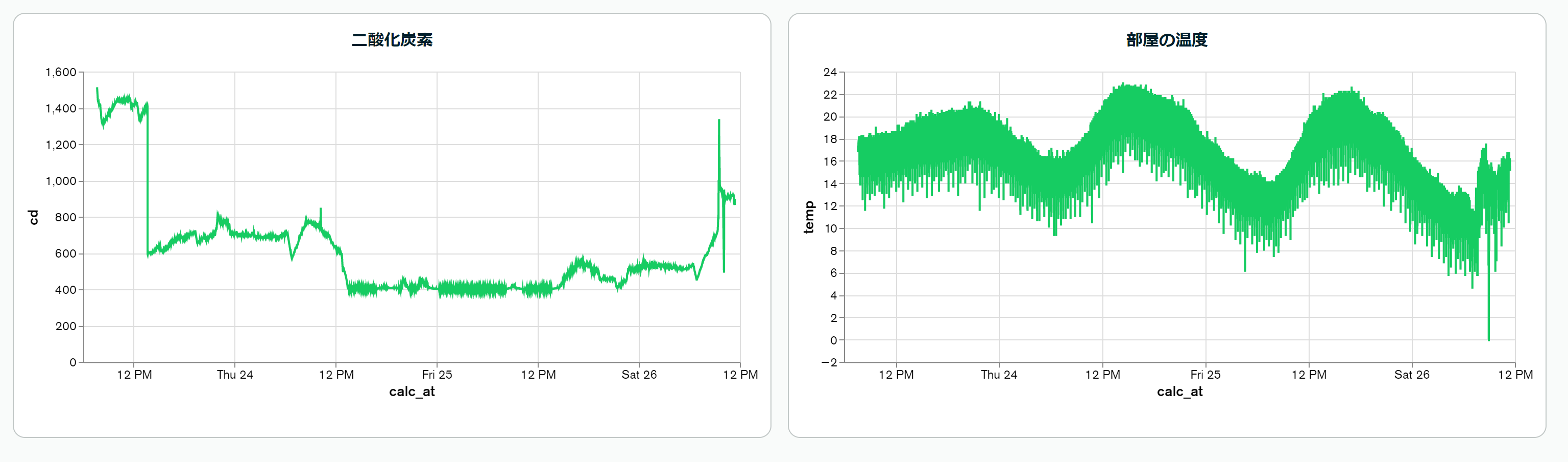
温度の値が安定していないのがまだ原因がわかってないですが、一応測定した値は記録できているようです。